Want to advertise?

Promote your business or project for just €2 per month.

Learn more →
Skip to content

València Informada

Practical guides, open data and official sources to better understand Valencia and the Valencian Community.

Menu
  • Home
  • Guides
    • Services
    • Practical guides
  • Bulletins
    • Archive
    • Bluesky Valencia
    • Official updates
    • Citizen bulletins
  • Health
    • Health-centre directory
  • Mobility
  • Data
    • Open data
    • Municipalities
    • Tourist accommodation
    • DANA
  • Tourism
    • Tourism and culture
    • Municipality guide
  • About
  • Contact
  • ESCAEN
Menu
Health centres

Onda I health centre in Onda: appointments, address and contact

Practical guide to Onda I health centre: address, map, contact, assigned-centre checks, SIP appointments, GVA +Salut and what to verify before visiting.

28 August 2024 3 min read Updated 10 Aug 2026

On this page

  1. Quick reference for Onda I
  2. Confirm your assigned centre
  3. Requesting a primary-care appointment
  4. What to prepare before making contact
  5. Telephone and administrative requests
  6. Services and opening arrangements can change
  7. Using GVA +Salut safely
  8. Emergencies and severe symptoms
  9. Accessibility and arrival
  10. Final check

Reviewed on 10 August 2026. Independent guide to Onda I health centre with its address, contact details and appointment steps. It is not part of the Generalitat and cannot book consultations. Verify operational information with the health authority before visiting.
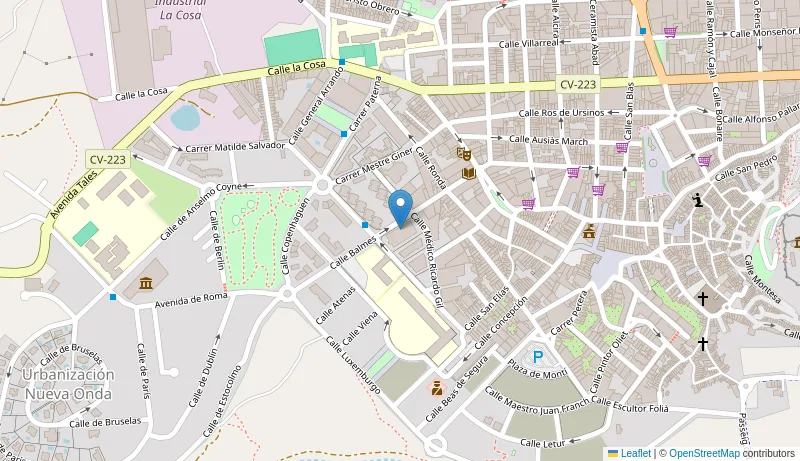
Reference map for Onda I health centre in Onda

Quick reference for Onda I

Centre Onda I
Municipality Onda
Published address BALMES, S/N, 12200, Onda
Contact +34964558250

The address for Onda I has no building number; open the map pin and compare it with the official directory before travelling. Open the map position for Onda I as a navigation aid, not as proof of assignment.

Confirm your assigned centre

The nearest facility is not always the assigned one. To check whether Onda I serves your address, use the official address-based finder or review the information linked to the SIP card. Repeat this check after moving home.

Requesting a primary-care appointment

The regional health authority offers appointments through its website, GVA +Salut and direct contact with the centre. Online access normally requests the SIP number and date of birth before showing available schedules. Start from the official appointment guidance and avoid links received in unexpected messages.

If the Onda I schedule shows no suitable option, official guidance recommends contacting the centre or visiting reception. An empty online calendar does not confirm closure and may depend on the service or published booking period.

What to prepare before making contact

Have the SIP card, date of birth and, where required, identification ready. For a clinical visit at Onda I, take the confirmation and requested documents; do not send healthcare information through unofficial forms or accounts.

  • Check the exact name of the centre.
  • Note the purpose of the administrative request.
  • Keep the appointment confirmation.
  • Ask first when acting for another person.

Telephone and administrative requests

The published telephone for Onda I is +34964558250. Use it to confirm opening arrangements, accessibility, documents or the appropriate route for an administrative request. Routine contact is never a substitute for 112 and must not delay emergency assistance.

CS-ONDA-I_mapa.png

Services and opening arrangements can change

Do not assume that Onda I provides a particular test, specialty, paediatrics or out-of-hours care merely because it is a health centre. Check the required service and special arrangements through the official Patient Portal.

Using GVA +Salut safely

The official app can manage primary-care appointments and provide SIP-linked functions. Follow the institutional GVA +Salut guide and download it through stores linked by the Generalitat. Onda I should not request payment or passwords to allocate a routine appointment.

Emergencies and severe symptoms

Call 112 in an emergency or when symptoms are severe. For an urgent need that cannot wait for a routine Onda I appointment, follow instructions from official healthcare services. This page provides administrative orientation and cannot assess symptoms or treatment.

Accessibility and arrival

If you require step-free access, interpreting, a companion or help reaching Onda I, confirm arrangements before travelling. Check the entrance, allow reasonable time and tell staff about support needs when you arrive.

Final check

  1. Confirm that the appointment names Onda I.
  2. Recheck the address and hours that day.
  3. Take the SIP card, identification and confirmation.
  4. Keep the official contact route available.

Editorial note: the address and contact come from the record available when this page was reviewed. If relocation, reorganisation or telephone changes create a difference, the Conselleria de Sanidad directory takes precedence.

Share on social media
x facebookwhatsapptelegram
Follow us on social media
x

València Informada editorial team. Published on 28/08/2024 and updated on 10/08/2026.

Informational content based on public sources. València Informada is not an official website and does not replace the competent public administration.

Main sections

  • Official updates
  • Practical guides
  • Open data
  • Mobility
  • Health
  • Tourism and culture

València Informada

Independent citizen portal with practical guides, open data, bulletins and official sources from Valencia and the Valencian Community.

Guides

Practical guidesArchiveBulletinsContact

Transparency

About usAbout the siteEditorial policySources usedCorrections

Legal

Legal noticePrivacyCookies
©2026 València Informada
Manage consent
To provide the best experiences, we use technologies such as cookies to store and/or access device information. Consent to these technologies will allow us to process data such as browsing behaviour or unique IDs on this site. Not consenting or withdrawing consent may negatively affect certain features and functions.
Functional Always active
Technical storage or access is strictly necessary to enable the use of a service explicitly requested by the user or to transmit a communication over an electronic communications network.
Preferences
Technical storage or access is necessary to store preferences that were not directly requested by the user.
Statistics
Technical storage or access is used exclusively for statistical purposes.
Marketing
Technical storage or access is necessary to create user profiles for advertising purposes or to track the user across different websites.
Manage options Manage services Manage vendors Read more about these purposes
View preferences